

Approvals and questions
Ask me questions (in Execution) lets the agent stop and ask you something (request_user_input). Durable execution is on by default, so the run pauses and survives a restart: a chat shows the question in the thread with a reply box (the run is paused until you answer), and a desk run’s question appears under Waiting on you and in the run header. With durable execution turned off the question is live instead: a chat shows it inline in the streaming turn and the same turn carries on with your answer. Default: chats ask, runs do not; set Yes or No to override. A chat with tools off has no tool layer, so it cannot ask. Durable execution (on by default) also lets an interrupted turn (paused, stopped, loop-stopped, out of budget or time, or failed) be continued (see Stop, continue, compact and agent control); the cost is that questions and approvals pause the run durably instead of waiting live, because the framework cannot hold both. Turn it off in Execution (or with /durable in a chat) to get the live wait back.
Approvals
Section titled “Approvals”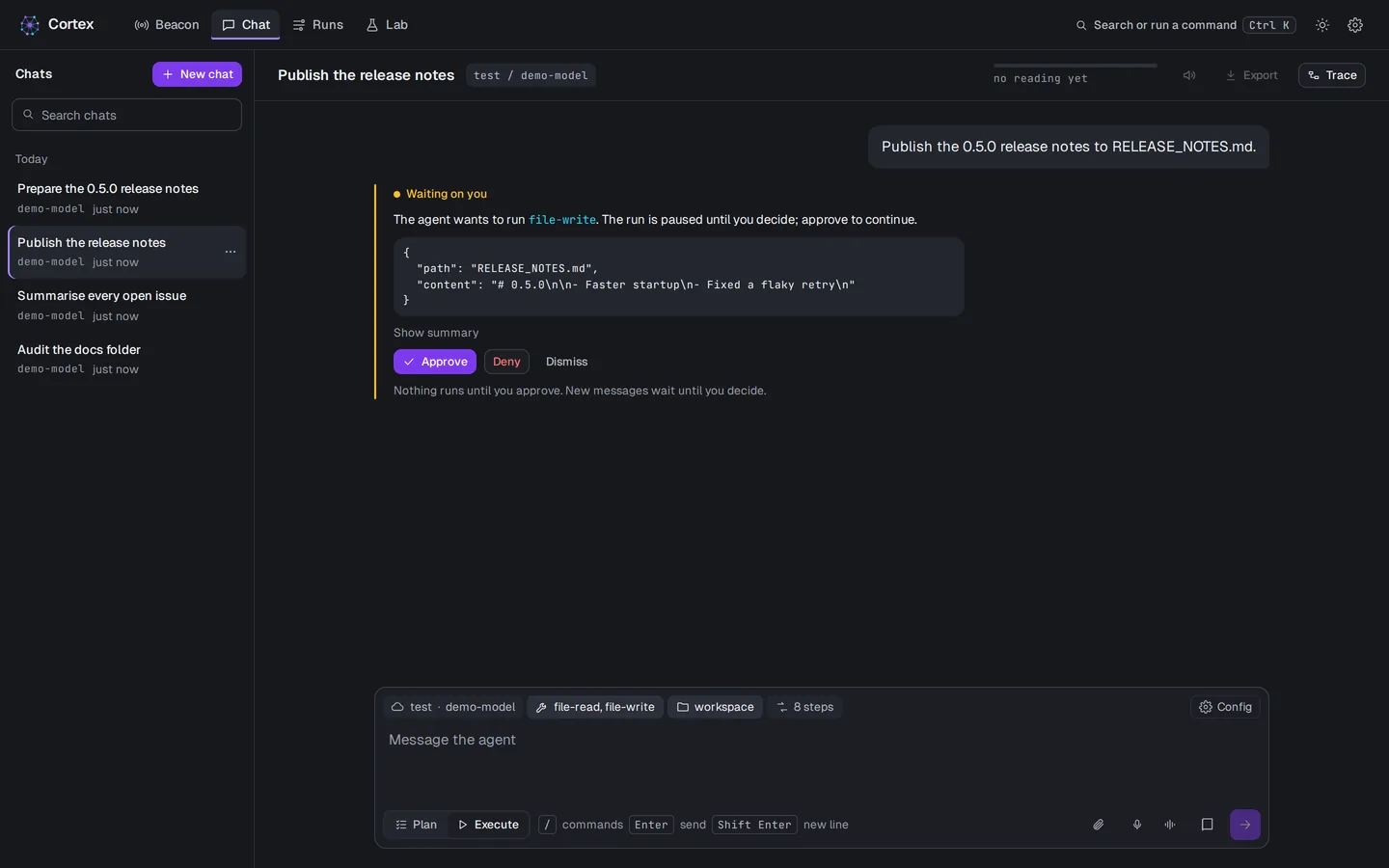
Approvals (in Tools, and /approvals in chat) choose which tool calls and which shell commands wait for you. It is the framework’s approvalPolicy (.withApprovalPolicy({ tools, commands, mode })), stored as is with the agent or chat:
- Tools: tick the tools whose every call needs approval. A shell toolset such as
gitshows asshell-execute; gating it asks before every shell command. - Shell commands: rules such as
git pushorgh pr create. A rule matches by leading words:git pushmatchesgit push origin main, notgit pull. Each part of a command joined with&&,;or|is checked, sogit add a && git commit -m xmatches agit commitrule. A bare*matches nothing. With the read-onlygittoolset, a rule is also what lets that git write run at all once you approve it: approvinggit add … && git commit …with only agit commitrule still refuses thegit add. In chat,/approvals add git pushadds a rule;/approvalslists the mode, tools and rules to toggle. - Cortex asks by default. With no policy set, Cortex applies a rule-less
detachpolicy, so writing files, running code and the full shell wait for your approval in chats and desk runs. Switch it off per agent with Ask before risky tools in Lab Tools · Approvals, or with/approvals· Turn approvals off in chat (askBeforeRiskyTools: false). An explicit policy you set always wins. This is Cortex’s default only; the framework’s own default is unchanged. Gateway agents run headless, so they getblock: a gated call is refused instead of waiting for nobody. A chat with tools off has no gate. - Once anything is gated, the framework also gates every tool it marks as needing approval (
file-write,file-edit,code-execute, and the full host shell). The editor shows those locked on. - When one is called: Pause and ask me (
detach) makes the run wait until you approve or deny it. With durable execution on (the default) the run pauses in a store and continues when you decide, even across a restart; with it off the run stays live in Cortex and continues the moment you decide. Refuse (block) decides in place; Cortex has no in-place approver, so the call does not run and the agent is told it was refused.
With durable execution turned off, a gated call waits live (with it on, the default, see the paused turn below): in chat, an approval card appears in the streaming turn showing the tool and its arguments, and the run view header, the Runs page’s Waiting on you strip and Beacon offer the same Approve / Deny. Approve runs the tool and the same run carries on; Deny (with an optional reason) tells the agent the call was refused and the run carries on without it. When sub-agents run in parallel and several ask at once, each request is listed on its own with the sub-agent’s name and answered individually. A chat turn keeps running when its page is closed or reloaded: reopening the chat re-attaches to the turn, brings back the pending card and finishes the reply once you answer. A live wait ends if you stop the run and on a Cortex restart.
A run a guardrail ended reads Blocked by guardrail (not Failed) in Runs, the run header and Beacon, and its Why it ended card says a guardrail blocked it.
One approval shows in one place at a time. Where its chat or run is on screen, it is the card in the chat or the run view header; anywhere else (another page, another chat, another run) an Approval needed prompt appears in the corner, and it goes away when you open that chat or run. Answering from any of them clears all of them. Dismiss on a chat card hides the card only: the call is still waiting, and the run view header and Waiting on you still answer it.
With Durable execution on (in Execution; it is on by default), the wait also survives a restart: the run checkpoints and pauses, the paused chat turn is held with an approval card (Approve, Deny, or Dismiss to hide the card), new messages wait until you decide, and the resumed reply lands in the thread. The card shows the call’s parameters (long, multi-line or nested values get Show full parameters; credential-shaped tokens are masked). Approve and Deny answer at once: the card goes away and the chat returns to the live view, where the approved call shows as a normal tool call that runs, with its parameters and result one click away, and the run carries on streaming. The call stays in the thread after a reload. If the run then wants a different gated call, a new card asks for that one; an approval covers only the call you saw. Configs saved before this kept the gate under Durable execution (durableRuns.approvalTools); they are read as the same policy.
An agent can also ask several typed questions at once: pick one, pick many, yes or no, a number, or free text. Cortex shows them as one form wherever a question appears (the streaming chat turn, a paused chat turn, and Waiting on you). Required questions are marked and optional ones say so; a problem shows under the question it belongs to, and Send answers sends every answer together. If an answer breaks a rule the agent set (a number out of range, a choice that is not offered, a missing required answer), Cortex tells you what to fix and the agent keeps waiting. A question that offers “something else” also takes a typed value. In the thread your answers read as one line per question. Questions that use the older single-question form work as before.
With durable execution on (the default), the agent can also stop and ask you something (request_user_input). In chat, the question appears in the thread with a reply box: Yes / No for a confirmation, one button per option for a choice, fields for a form, or a text box. Your answer resumes the run, and the question, your answer and the agent’s reply land in the thread. Dismiss drops the paused turn. New messages wait until you answer.
Agent-proposed approval changes
Section titled “Agent-proposed approval changes”With Agent control on and the Approvals switch ticked (/agent), the agent can propose turning Ask before risky tools on or off. Turning it on (stricter) can apply by itself if you also allow automatic stricter approvals; turning it off (looser) always waits for your Apply, and the card says it gives the agent more reach.
Sub-agents
Section titled “Sub-agents”When sub-agents run in parallel and several ask at once, each request is listed on its own with the sub-agent’s name and answered individually. A sub-agent’s own transcript opens from its card in the chat (a side drawer), and each sub-agent run has its own page in the run view.
Related: Chat and composer and Lab builder.
Install
Bun (recommended)bun add reactive-agentsNode 22.5+npm install reactive-agentsGet notified on new releases