

Settings and keys
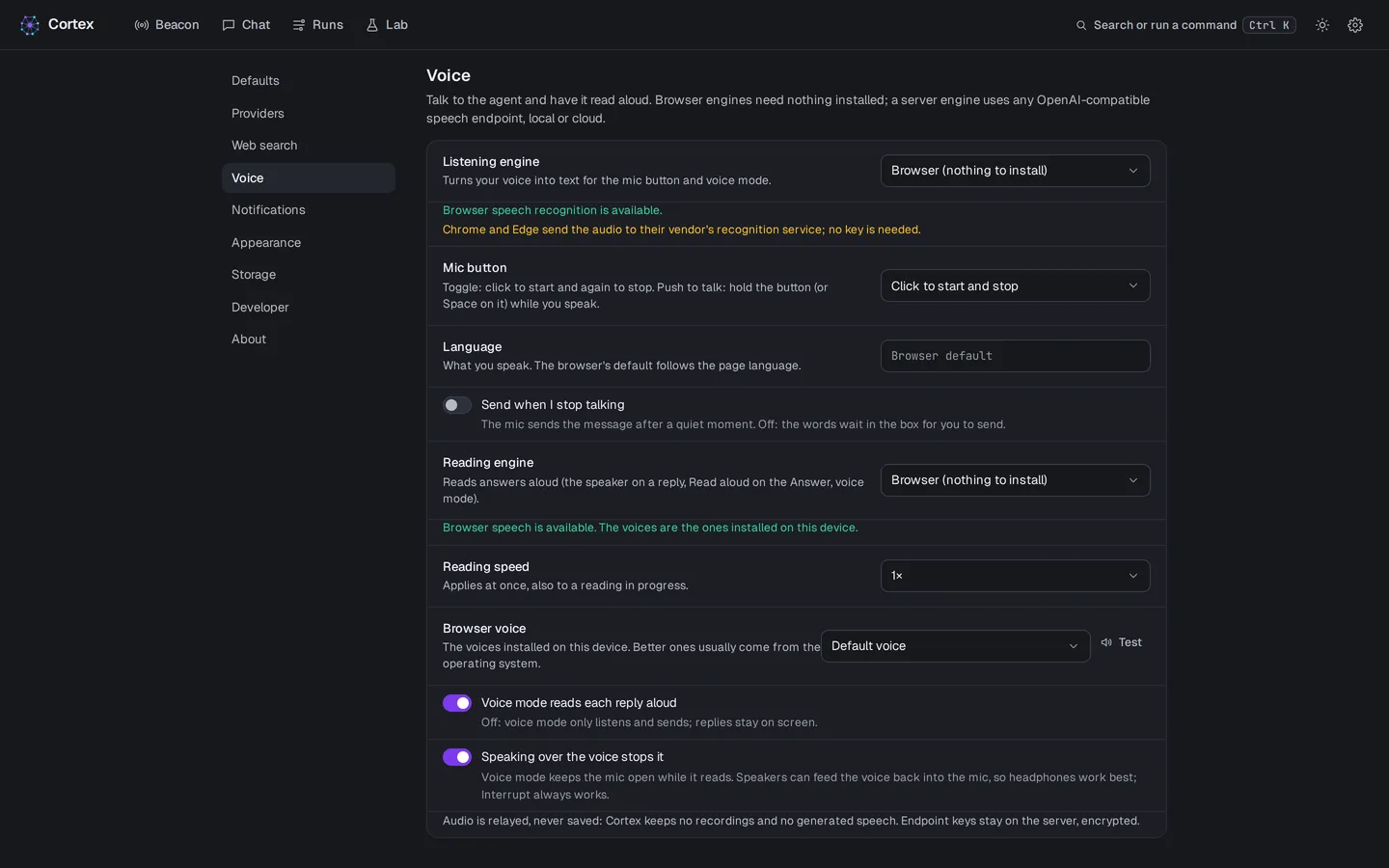
Settings has a section nav on the left and one row per setting. Save settings writes Defaults, Providers, Notifications, Storage and Developer; Appearance applies at once.
- Defaults — the provider and model that Beacon, new chats and the Lab Builder start with. A provider without its API key reads “(key missing)”, and the help text names the variable to set.
- Web search — one row per keyed search provider of the
web-searchtool: Tavily (TAVILY_API_KEY), Brave Search (BRAVE_SEARCH_API_KEY, aliasBRAVE_API_KEY), Serper (SERPER_API_KEY) and Keenable (KEENABLE_API_KEY). DuckDuckGo instant answers, the last step of the chain, need no key. Add key / Replace saves a key encrypted like a provider key, Test runs a one-result search against that provider (it spends one query of your quota), Remove deletes it. Agents use a saved key: chats, runs and saved gateway agents pass it to theweb-searchtool in code (.withTools({ webSearch: { apiKeys } })), so it is never written to the server’s environment, a config, a trace or a tool result. As with provider keys, a key in the server’s environment wins unless you tick Use saved key instead of the environment’s. Which providers an agent tries, and in what order, is set per agent under Tools in the builder and chat config panel (see Lab builder). “Export as code” does not include saved keys; it lists them as not exported. - Providers — one row per cloud provider (Anthropic, OpenAI, Gemini, Groq, xAI, LiteLLM, Ollama Cloud) saying which key agents use, plus a TypeSafe (Jev judgment) row for the judgment backend, then the Ollama endpoint and whether the Cortex server is connected. For Ollama Cloud, press the Ollama Cloud preset beside the endpoint (it fills
https://ollama.com), press Apply, and add your Ollama API key; the endpoint then applies to runs, chats, helper agents, the model list and capability checks, and the model picker lists the cloud models. The Ollama key is sent only to a non-local endpoint, never tolocalhost; a rejected key reads “Ollama Cloud key missing or invalid” with a link here. Judgments (below) cannot use Ollama Cloud: Ollama’s scoring models run on local weights only. Add key / Replace saves a key on the Cortex server, Test lists the provider’s models with it (a typed key is tested before you save it), Remove deletes it. Saved keys are encrypted (AES-256-GCM) in.cortex/beside the database, in files only your user can read, and the browser only ever sees••••plus the last four characters. A key in the server’s environment (or.env) wins; when both exist, Use the saved key instead switches to the saved one. Agents get the saved key through.withProvider(provider, { apiKey }), for every provider listed. - Voice — how the mic listens, how replies are read, and voice mode (see Voice below). These apply at once and are not part of Save settings.
- Notifications — allow desktop notifications and pick what notifies you: finished and failed runs, and approvals and questions waiting on you (the recommended level and “Everything” include all four; “Failed runs only” and “Never” are narrower). The choice applies at once. Cortex notifies only while it is in the background (another tab or window has focus); with Cortex in front, the toasts and panels already show it. Runs started by the server (goals, loops, schedules) notify the same way.
- Appearance — Theme follows the system setting or pins dark or light (the top-bar switch pins the opposite of what is showing). Motion follows the system’s reduced-motion setting or reduces motion in Cortex regardless: it stops the ambient drift, the logo twinkle and the live animations, and running work still shows in status text.
- Storage — how long to keep runs, and Prune now to delete older ones. Runs live in
.cortex/cortex.dbunder the server’s working directory. - Developer — debug mode, hover tooltips, and how to connect an app (
.withCortex()orCORTEX_URL). - About — the Cortex and framework versions. Run from a source checkout, Cortex reads the repo’s
VERSIONfile and shows the git commit; an installed package shows its released version.
Both themes come from one set of design tokens, so every page reads the same in either. Fonts and icons are bundled with Cortex; nothing loads from a font CDN.
Request guard and listen address
Section titled “Request guard and listen address”Cortex has no login. By default the server binds 127.0.0.1, so only your own computer can reach it. On top of that bind, every /api/* and /ws/* request is checked against a Host and Origin allowlist, which stops a DNS-rebinding page from reaching a loopback Cortex through your browser. A request that fails the check gets 403 Forbidden: Host or Origin not allowed. Set CORTEX_ALLOWED_HOSTS to add a name. No CORS headers are ever added.
- Allowed
Host:localhost,127.0.0.1,[::1](any port), any IP address literal, the host ofCORTEX_URL, and the comma-separated names inCORTEX_ALLOWED_HOSTS. - Allowed
Origin: the same names, except IP addresses other than loopback: a page served from a LAN address cannot call a loopback Cortex.
Serving Cortex under a DNS name (a reverse proxy, a tailnet name, a team host) therefore needs that name allowed:
CORTEX_HOST=0.0.0.0 \CORTEX_ALLOWED_HOSTS=desk.internal,cortex.team.example \rax cortexAccess token
Section titled “Access token”On loopback (the default bind) no token is needed. Binding off loopback (CORTEX_HOST=0.0.0.0) requires CORTEX_TOKEN; the server refuses to start without it.
CORTEX_HOST=0.0.0.0 CORTEX_TOKEN="$(openssl rand -hex 32)" rax cortexWhen CORTEX_TOKEN is set, /api/* and /ws/* accept it in any one of three forms:
Authorization: Bearer <token>- the
cortex_tokencookie. OpenGET /?token=<token>once in the browser and Cortex sets it (HttpOnly, SameSite=Strict). ?token=<token>on/ws/*connections.
Requests tagged Sec-Fetch-Site: cross-site are refused, which closes cross-site GETs that carry no Origin.
Other guards
Section titled “Other guards”- Tool playground approval.
POST /api/tools/invokeanswers 409 for tools the framework gates withrequiresApproval(code-execute,file-write,file-edit, docker and shell) until the body carriesapproved: true. The Lab’s Catalog and test and Custom tools panels ask you to confirm first. MCP credentials are write-only too: the server’s Credentials tab shows Set for a stored key, never its value. - MCP secrets are write-only.
GET /api/mcp-serversmasksenvandheadersvalues and OAuth secrets. Saving a config that still holds a masked value keeps the stored one.PUT /api/mcp-servers/:id/secretssets, replaces or removes singleenv/headerskeys ({ env: { set, remove }, headers: { set, remove } }); the response lists key names, never values, and a probe’s stored error has the server’s own credentials scrubbed. - Outbound URL validation. The Ollama endpoint and the voice base URLs accept http(s) only, no embedded credentials, and no link-local or cloud-metadata host (including names that resolve to one). Model discovery and voice calls never follow redirects.
- Private storage.
.cortex/is created0700and the database (and its-wal/-shm)0600.
Environment Variables
Section titled “Environment Variables”| Variable | Default | Purpose |
|---|---|---|
CORTEX_PORT |
4321 |
Cortex server listen port |
CORTEX_HOST |
127.0.0.1 |
Interface the server binds (loopback only by default) |
CORTEX_URL |
http://localhost:4321 |
Base URL used by .withCortex() if not passed explicitly |
CORTEX_NO_OPEN |
unset | Set to 1 to prevent opening a browser on server start |
CORTEX_LOG |
info |
Server log verbosity: error | warn | info | debug |
CORTEX_SKILL_SCAN_ROOT |
— | Extra folder suggested in the workspace picker (and scanned by the older GET /api/skills/files) |
CORTEX_ALLOWED_HOSTS |
unset | Extra host names the request guard accepts (comma-separated) |
CORTEX_TOKEN |
unset | Access token; required when CORTEX_HOST is not loopback |
CORTEX_CHAT_MAX_SESSIONS |
8 |
Cached chat agents kept in an LRU |
Model pages
Section titled “Model pages”The model link in a chat turn or under Defaults opens the model page (/models/<provider>/<model>): context window, max output, tool-call support and thinking, the remaining capability values, a note when the values are fallback defaults rather than measured ones (with what recorded runs on that model used), recent runs by name, and Start a chat with this model. Three more sections show what the model costs and how the harness adapts to it:
- Price — the rates the framework bills this model’s calls at, per million tokens: input, output, cache read and any long-context tier, with where the rates came from (the bundled LiteLLM price list, a provider price page, a LiteLLM proxy, a remote price list with its name, or your own pricing) and their date. A local Ollama model reads Free (local). A model the framework has no rate for reads Price unknown: its calls carry no cost, and any total that includes them is shown as a lower bound.
- Spend — over the model’s last 50 runs in Cortex: total spend (priced by the framework when each call finished; marked
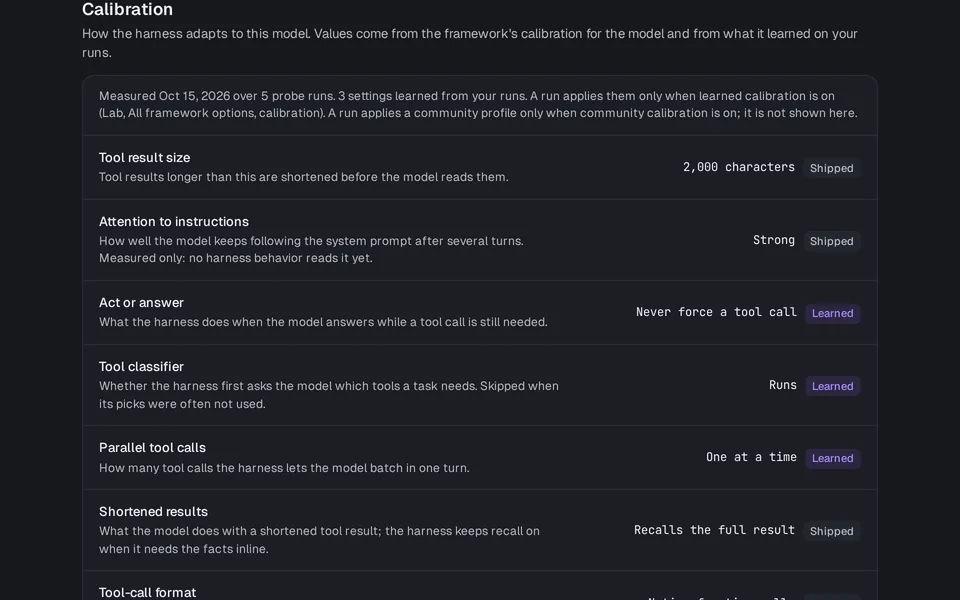
≥when a call had no known price), spend per successful run (all spend divided by the runs that finished with a full answer, so failed runs count against the successes), and tokens in, out and served from the prompt cache. Calls on another model inside the same runs (a fallback) are not counted. - Calibration — the framework’s calibration for the model: tool result size, attention to instructions, act or answer, tool classifier, parallel tool calls, shortened results and tool-call format, each in plain words with what it does and whether it is Shipped (the measured calibration) or Learned from your runs (with the shipped value it replaced). Below: how many runs the framework has observed on this model and the counts behind the learned values (learning starts at 5 runs), and the uncertainty thresholds the reactive-intelligence sensor learned from scored steps. Strategy learning lists, per kind of task, how each reasoning strategy did on this model as the framework’s strategy chooser learned it (success estimate and runs scored, best marked; a run counts as a success when its average uncertainty stayed below 0.5), read from the calibration database. Learned values and community profiles are opt-in and off by default: a default run applies only the shipped calibration, and the page labels learned values as applied only when learned calibration is on. Turn them on per agent in the Builder under Reliability (Learned calibration, Community calibration; chat has the same switches in its quick config). Community also needs telemetry allowed (
DO_NOT_TRACKandREACTIVE_AGENTS_TELEMETRY=0block it). A model with no shipped calibration runs on the harness defaults, and the page says so. Cortex only reads calibration; it never changes it. The tiers and the builder call are in Model Calibration.
Prices in pickers. Every model dropdown (the chat /model menu, the builder’s Model section) shows each model’s input / output price per million tokens next to its name, free (local) for Ollama, or price unknown. A provider’s model list (/models/<provider>) can be sorted by Lowest price. Run costs everywhere (vitals, the Runs list and its total, trace rows, compare) never count an unpriced call as $0: they show the priced part as a lower bound (≥ $0.012) and say the total is partial. A run’s cost includes its post-run debrief call: while the run’s final total is still pending the figure is the sum of the calls seen so far, and it updates once the framework reports the billed total.
Install
Bun (recommended)bun add reactive-agentsNode 22.5+npm install reactive-agentsGet notified on new releases